
15 hands-on computational thinking activities for elementary students — decomposition, pattern recognition, abstraction, and algorithm design, built for classrooms with zero budget and no reliable internet.
I teach Mathematics and the technical subjects of a Systems Development track in public schools across the São Paulo networks, and I run a Digital Education Laboratory where computational thinking is the foundation everything else — robotics, AI, programming — gets built on. This is not a definitions page. It’s fifteen activities I actually run with elementary students (ages 6–11, aligned to Brazil’s Ciclo de Alfabetização and Ciclo Interdisciplinar), organized by the four thinking skills they build.
Why Computational Thinking Activities Usually Fail in Elementary Classrooms
Abstraction Without Concreteness
Reality check: Worksheets asking a six-year-old to “sequence an algorithm” with no physical object and no stakes if it’s wrong.
Young children don’t build algorithmic thinking from definitions. They build it from consequences — the toy car went off the table because step three was missing.
Tool-Dependency Disguised as Pedagogy
Reality check: A coding app that keeps the child entertained but does the thinking inside its own constraints.
Remove the tablet and the child has learned to operate an interface, not to decompose a problem.
Unplugged First, Tools as Bridges
Best for: Teachers who need activities that work with paper, physical objects, or a body in a room.
Several activities below connect to free browser-based tools built specifically for public school labs with unreliable internet — tools support the thinking here, they never replace it.
The Four Skills, and Why the Order Matters
Computational thinking breaks into four components: decomposition (breaking a problem into parts), pattern recognition (spotting what repeats), abstraction (keeping what matters, dropping what doesn’t), and algorithm design (the precise sequence that solves the problem).
Elementary sequencing should follow that exact order. Children asked to “write an algorithm” before practicing real decomposition produce sequences that look correct on paper and fall apart the moment you test them — because they never learned which details actually mattered.
Decomposition: Breaking Problems Into Parts
The Sandwich Breakdown
Students write every step to make a peanut butter sandwich, as literally as possible. A “robot” executes exactly what’s written — nothing implied. The first attempt always fails: “open the jar” gets executed by trying to open a closed fist over an unopened jar.
Build-the-Room Puzzle
In small groups, students decompose “clean the classroom” into sub-tasks and assign each to a subgroup, then discuss which tasks depended on another finishing first.
Story Chunking
Using a picture book, students break the narrative into its smallest independent scenes and reorder them on cards.
The Function Factory (digital, offline-capable)
Students use a browser-based simulator where a visual “machine” takes an input, applies a hidden rule, and produces an output — decomposing the rule themselves before touching the machine.
Pattern Recognition: Spotting What Repeats
Human Bar Graph
Students physically line up by height, shoe size, or birth month, describing the pattern out loud before translating it into an actual graph.
Clap-Pattern Relay
The teacher claps a repeating rhythm; students identify the repeating unit and predict the next five beats.
Sorting Without Instructions
A pile of mixed objects (buttons, bottle caps) is sorted with no rule given. Students explain the rule they invented afterward.
Chessboard Pattern Hunt
Using a physical chessboard, no pieces needed, students find every pattern: alternating colors, diagonal symmetry, row/column coordinates.
Abstraction: Keeping What Matters, Dropping What Doesn’t
Map-a-Route
Students draw a map from the classroom to the school gate; a partner must follow it exactly. The maps that work keep only the landmarks that matter.
Icon Design Challenge
Students design a single icon (no words) for a classroom rule. A five-year-old across the room should instantly understand it.
The Animal Sorter
Students invent a small set of yes/no questions that correctly separates a set of animal name cards into groups.
Fractions Kingdom (digital, narrated)
A gamified simulator with audio narration for pre-readers, where students manipulate visual fraction models.
Algorithm Design: Writing the Precise Sequence
Human Robot Grid Walk
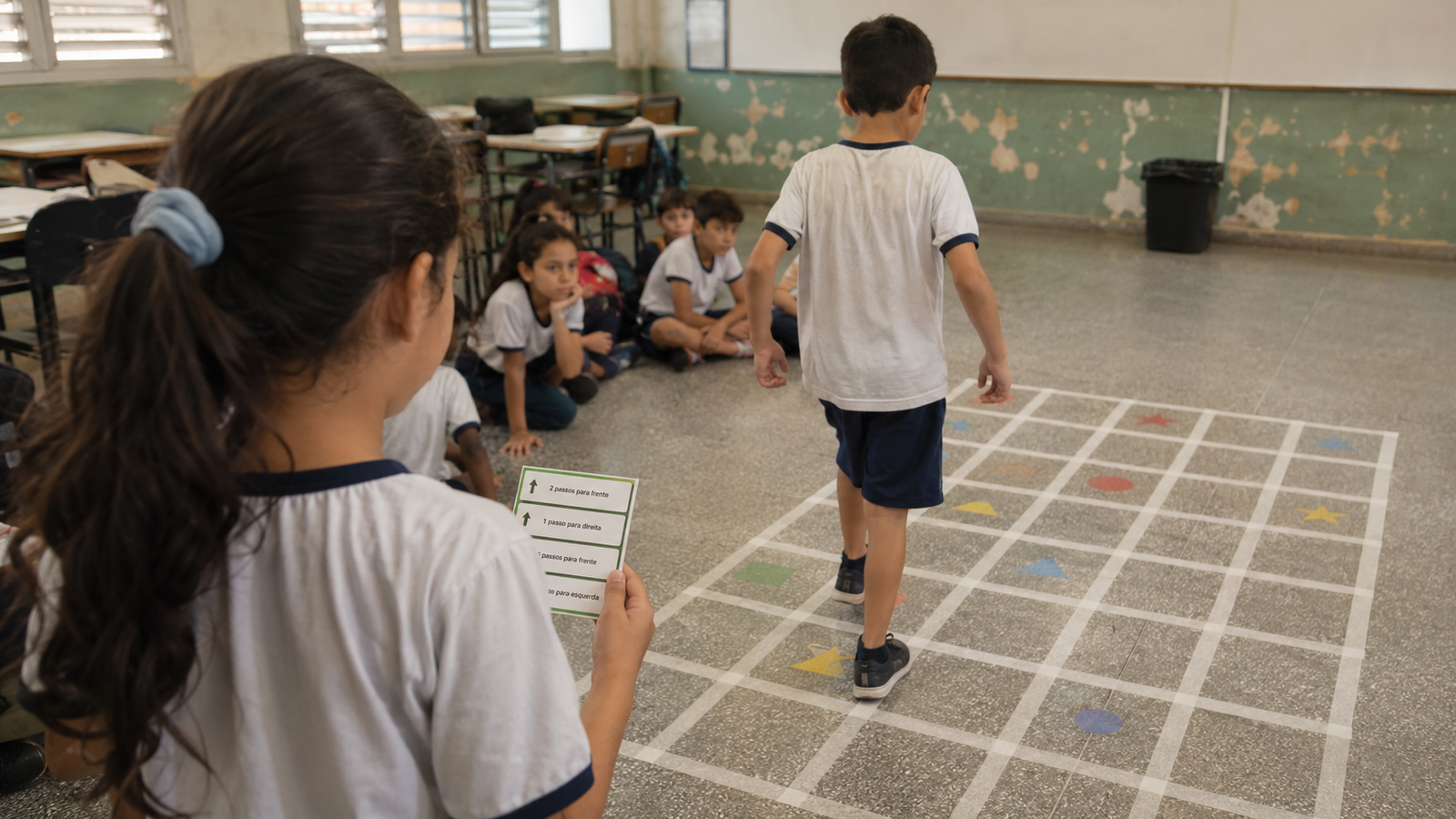
One student navigates a taped floor grid using only exact commands from a partner — “forward two, turn right, forward one.”
Debug the Recipe
Students receive a deliberately broken set of instructions — steps out of order, one missing, one redundant — and must find and fix every error.
Chess Opening Algorithm
Older students (9–11) write an explicit “algorithm” for the first three chess moves — precise enough for a non-player to execute from the text alone.
Infrastructure Reality Table
| Constraint | Standard Response | Why It Works |
|---|---|---|
| 50-minute periods | Every activity fits setup + debrief in one class | Debrief is not optional — it’s the actual lesson |
| Shared computer lab | Digital activities are offline-first by design | No live connection can be assumed |
| Class of 30 | Trios, not pairs, for unplugged activities | Pairs default to one leader, one passive follower |
| Mixed-age classroom | Same 15 activities, different complexity | The thinking skill stays constant, the material scales |
Frequently Asked Questions
What age range do these activities work for?
Roughly 6–11 years old. I run the exact same fifteen activities across that range — what changes is the complexity of the sandwich, the grid, or the chess sequence, not the underlying skill.
Do I need any technology to run these?
No. Thirteen of the fifteen require only paper, physical objects, or a body in a room. The two digital activities are offline-capable single-file tools, never dependent on a live connection.
How does this connect to teaching AI later?
The Function Factory activity here is the same simulator that later becomes the entry point for explaining neural networks — a neuron is a function machine with adjustable weights. The scaffolding is built before the AI vocabulary shows up.
What if my class has 30+ students and no aide?
Group in trios, not pairs. Trios naturally rotate roles and produce more genuine debate about the “correct” sequence than pairs do.
Final Thought
None of these fifteen activities mention artificial intelligence, and that’s deliberate. A student who has genuinely practiced decomposition, pattern recognition, abstraction, and algorithm design — with their hands, on paper, in a chess position, in a broken recipe — arrives at a machine learning concept later with the scaffolding already built.
If you teach elementary students in a resource-constrained classroom anywhere in the world, none of this requires a lab, a license, or a budget line. It requires a chessboard, some index cards, a blindfold, and thirty minutes of your Friday.
Want the tools, templates, and lesson structures as they’re built?
Join teachers from around the world applying computational thinking in real, resource-constrained classrooms — not just reading about it.